
Start a web hosting company without investing in expensive servers or building your own data center. With a reliable hosting provider, a professional website, and automated billing software, you can launch your own hosting business and start selling services under your brand.
However, running a hosting business involves more than renting server space. You’ll need to set up your website, configure WHMCS, integrate payment gateways, and automate customer provisioning.
This step-by-step guide walks you through everything you need to launch your web hosting company, even if you’re starting from scratch.
How Does a Web Hosting Business Work?
Before getting started, it’s helpful to understand how the different systems connect.
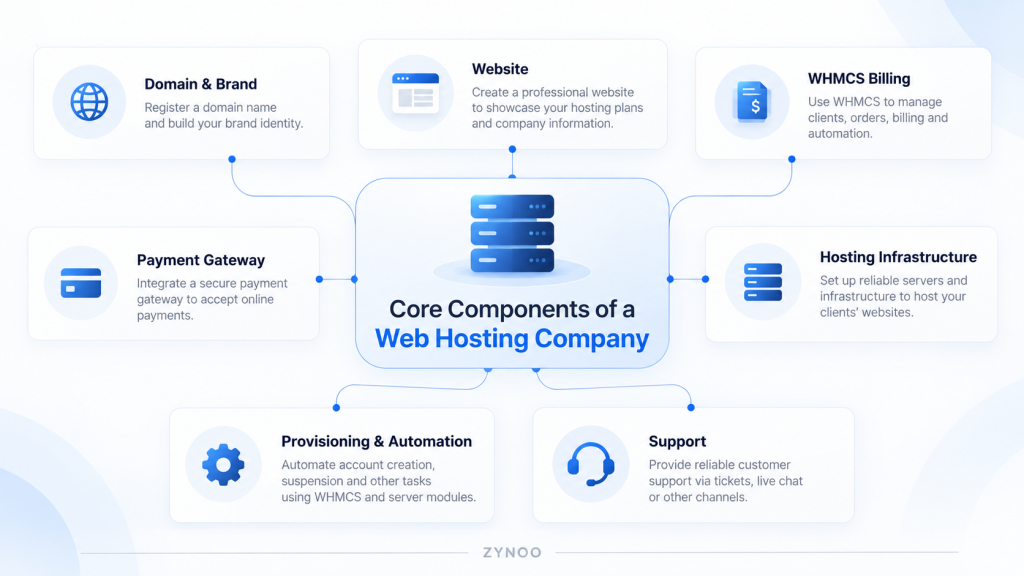
A typical hosting business has four main components:
- Business website: Displays your hosting packages and helps customers choose a service.
- Billing platform: Manages orders, invoices, renewals, and customer accounts.
- Payment gateway: Processes customer payments securely.
- Hosting infrastructure: Provides the actual web hosting accounts or virtual servers.
When a customer orders hosting, the billing system processes the order and payment. Once the order is approved, it can communicate with the hosting platform to create the customer’s account automatically.
How to Start a Web Hosting Company: 10 Steps
Step 1: Choose Your Hosting Business Model
First, decide what kind of hosting services you want to sell.
For beginners, shared reseller hosting is usually the simplest entry point. You purchase a reseller package and create individual hosting accounts for customers.
Other options include VPS reselling or managing your own dedicated server infrastructure.
| Hosting Model | Best For |
|---|---|
| Shared reseller hosting | Beginners, freelancers, web agencies |
| VPS reseller hosting | Technical businesses selling virtual servers |
| Dedicated server infrastructure | Experienced providers wanting greater control |
Start with the model you can afford and support confidently. You can expand into additional services later.
Step 2: Register Your Business Name and Domain
Choose a short, memorable business name that customers can easily recognize.
Check whether the matching domain is available through a registrar such as Namecheap, GoDaddy, or another established provider.
A .com domain is a familiar choice, although other extensions may suit your brand.
You’ll also need to:
- Register your business according to local requirements.
- Create a professional business email address.
- Prepare a logo and basic brand identity.
- Arrange the tax and payment accounts required in your country.
For example, your business could use yourbrand.com for its website and support@yourbrand.com for customer inquiries.
Step 3: Create Your Web Hosting Website
Your website is your storefront. It should explain your services clearly and make purchasing hosting straightforward.
You can build it using WordPress, a website builder, or a custom-developed design.
For beginners, WordPress is a practical choice because it offers ready-made themes and doesn’t require extensive programming knowledge.
Start with these essential pages:
- Home
- Hosting Plans
- About Us
- Contact and Support
- Terms of Service, Privacy Policy, and Acceptable Use Policy
Each hosting plan should clearly display its price, storage, bandwidth, and included features.
Purchase a suitable hosting plan for your business website, connect your domain through DNS, and enable HTTPS using an SSL certificate.
Tip: You don’t need a complicated website at launch. A fast, professional design with transparent pricing and an easy checkout process is enough to get started.
Step 4: Choose Your Hosting Infrastructure Provider
Now you need the infrastructure that will host your customers’ websites.
If you’re using shared reseller hosting, choose a provider offering cPanel/WHM or another supported control panel.
Evaluate uptime commitments, available resources, customer support, backups, and whether your chosen billing platform supports the provider’s provisioning system.
Some providers include essential tools in their reseller packages, while others charge separately for control panel licenses, backups, and additional services.
Understand these costs before creating your retail packages.
When you start a web hosting company, choosing a dependable infrastructure provider is one of the most important decisions you’ll make. Reliable servers, responsive support, and automated provisioning can save you significant time as your customer base grows.
Step 5: Install WHMCS for Billing and Customer Management
WHMCS is a hosting billing and automation platform. It handles customer registration, orders, invoices, recurring payments, support tickets, and provisioning through compatible integrations.
It isn’t the same as cPanel. WHMCS handles the business side of hosting, while cPanel and WHM manage the hosting environment.
To get started:
- Purchase a WHMCS license and check its server requirements.
- Install WHMCS on compatible hosting, using a location such as
billing.yourbrand.com. - Complete the setup wizard with your company details, currency, and branding.
- Configure support departments, email settings, and invoice preferences.
- Enable the system cron job to run automated billing tasks.
WHMCS recommends running its system cron every five minutes, where supported.
Follow the official WHMCS installation guide for the latest requirements and setup instructions.
Step 6: Configure Your Payment Gateway
Customers need a secure way to pay for their hosting orders.
WHMCS supports multiple payment gateways, including Stripe, PayPal, and manual bank transfers.
First, create a merchant account with a provider available in your country. Complete any required business verification before accepting payments.
In WHMCS, navigate to Configuration → Apps & Integrations, find your payment gateway, and activate it.
Connect the gateway using its documented authorization process or API credentials.
Before going live, test that successful payments are recorded correctly, failed transactions remain unpaid, and refunds or recurring payments work as expected.
Gateway availability, processing fees, and supported payment methods vary by country and provider.
Step 7: Create Hosting Packages and Connect Provisioning
Next, create the products customers will purchase.
For shared hosting, you might offer Starter, Business, and Premium packages with different storage limits and account features.
If your provider uses WHM, create the corresponding hosting packages there.
Then open Configuration → System Settings → Servers in WHMCS and connect your hosting server using the appropriate module and secure API credentials.
Create matching products in WHMCS and configure their module settings.
WHMCS can automatically provision compatible hosting accounts after payment is received, depending on your automation configuration.
This means customers can purchase hosting and receive access without you manually creating every account.
For security, test provisioning before enabling automatic fulfillment for real customers.
Step 8: Configure Domain Registration (Optional)
If you want customers to purchase domain names alongside hosting, you’ll need a domain reseller or registrar account.
WHMCS supports integrations with various registrars, including Enom, OpenSRS, and ResellerClub.
Connect your registrar through Configuration → System Settings → Domain Registrars.
Then choose the domain extensions you want to sell, configure their prices, and test registration and renewal workflows.
You’ll also need to configure the nameservers or DNS settings customers should use.
Domain reselling isn’t mandatory when starting a hosting company. You can initially let customers use domains registered elsewhere.
Step 9: Set Up Support, Security, and Automated Tasks
Before accepting customers, prepare your daily operations.
Configure support tickets in WHMCS and make sure invoice notifications, password resets, and welcome emails are delivered correctly.
Use authenticated SMTP for reliable system email delivery and configure SPF, DKIM, and DMARC for your domain.
Enable two-factor authentication for administrators, keep software updated, and maintain backups of your website and billing database.
Also establish procedures for account suspensions, cancellations, abuse complaints, and server incidents.
Your customers need clear support expectations, especially if you’re a small company without a 24/7 support team.
Step 10: Test Everything Before Launching
Don’t accept live orders until you’ve tested the complete customer journey.
Create a test customer account, select a hosting plan, complete a test payment, and confirm that the hosting account is provisioned correctly.
Verify that the customer receives their welcome email and can log in to the hosting control panel.
Also test unpaid orders, renewals, support tickets, and failed provisioning attempts.
Once everything works, launch your website and begin promoting your business through SEO, web development partnerships, existing contacts, and relevant online communities.
How Much Does It Cost to Start a Hosting Company?
Your startup costs depend on the hosting model and software you choose.
Typical expenses include your domain, business website, hosting infrastructure, WHMCS license, control panel licenses where required, payment processing fees, and customer support tools.
You should also budget for marketing, security, backups, and business registration.
Start with a manageable number of hosting packages and calculate your margins carefully. Recurring customer revenue is useful, but profitability depends on support costs, customer retention, and operating expenses.
Frequently Asked Questions
No. Shared or VPS reseller hosting allows you to sell hosting services without owning physical servers. Your upstream provider manages the underlying infrastructure.
Yes. WHMCS is popular, but other compatible billing platforms and custom solutions are available. Choose one that supports your hosting provider and payment methods.
Yes. Many hosting businesses begin with shared hosting and expand into VPS or dedicated server services as their customer base grows.
Start by targeting a specific audience, such as local businesses, WordPress users, or web design clients. Offer clear packages, reliable onboarding, and responsive support instead of competing solely on price.
Conclusion
You don’t need to own expensive servers to start a web hosting company. With the right tools, reliable infrastructure, and a commitment to customer satisfaction, you can build a hosting business that grows steadily over time.
Begin with a domain, professional website, and suitable hosting infrastructure. Configure WHMCS, integrate a payment gateway, automate account provisioning, and test the complete ordering process before launch.
The key to building a sustainable hosting business is starting small, delivering reliable service, and expanding as you gain customers and experience.