
An MCP server is a program that allows AI applications to connect with external tools, services, and data sources using the Model Context Protocol (MCP). It acts as a standardized interface between an AI assistant and systems such as databases, file storage, and business applications.
For example, an AI assistant connected to an appropriate MCP server could retrieve order information, search company documents, or check the status of an application without requiring a custom integration for each task.
Let’s explore how MCP works, what an MCP server actually does, and when you might need one.
What Is Model Context Protocol (MCP)?
Model Context Protocol is an open standard designed to make connecting AI applications with external systems easier.
Think of it as a common communication method.
Without MCP, developers may need to create separate integrations for different AI applications and services. MCP provides a consistent way for compatible applications to discover available capabilities and interact with them.
For example, a company might use several tools to manage customers, projects, and documents. An MCP server can expose selected functions from those systems through a standardized interface.
MCP doesn’t replace existing APIs or databases. It provides a structured way for AI applications to interact with them.
How Does an MCP Server Work?
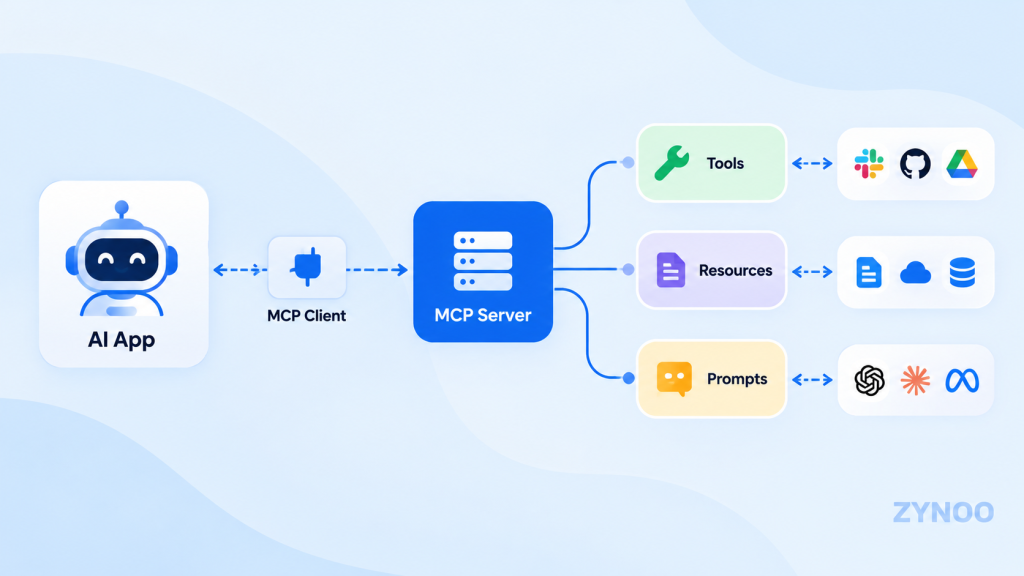
MCP uses a client-server architecture with three main components:
- MCP host: The AI application that the user interacts with, such as a compatible AI assistant or development environment.
- MCP client: A component within the host that communicates with an MCP server.
- MCP server: The program that makes specific tools, resources, or prompts available.
Here’s a simple example.
Imagine you ask an AI assistant, “What’s the status of order #12345?”
If the assistant has access to an authorized order-management MCP server, the process might look like this:
- You ask the AI assistant about the order.
- The assistant identifies an available tool for checking order status.
- Its MCP client sends a request to the appropriate MCP server.
- The server retrieves the information from the order-management system.
- The result is returned to the AI application, which presents it to you.
The MCP server doesn’t generate the AI response itself. It provides the external capability or information needed by the AI application.
The exact workflow depends on the application’s permissions, available tools, and how the server is configured.
What Can an MCP Server Do?
MCP servers can expose three core types of capabilities.
1. Tools
Tools are functions that AI applications can call to perform specific operations.
For example, an MCP tool might search a database, retrieve an order status, create a support ticket, or query an external API.
Tools can perform actions that change data, so appropriate permissions and safeguards are important.
2. Resources
Resources provide information that an AI application can access.
Examples include configuration files, documentation, database records, and other structured information.
A resource allows an application to retrieve relevant context without requiring the AI model to already know that information.
3. Prompts
Prompts are reusable templates that help users perform specific tasks through an AI application.
For example, an MCP server could provide a prompt template for analyzing an incident report or summarizing technical documentation.
Together, these capabilities make MCP useful for both retrieving information and supporting more advanced AI workflows.
Real-World Examples of MCP Servers
MCP becomes easier to understand when you look at practical applications.
Customer support: An MCP server could allow an authorized AI assistant to retrieve customer order details or support ticket information.
Software development: Developers can connect compatible AI coding tools to repositories, issue trackers, or development services.
Business reporting: An MCP server can expose approved database queries that retrieve sales figures or operational metrics.
Document management: AI applications can use MCP resources or tools to search documents and retrieve relevant information.
IT operations: A server monitoring integration might provide system health information or application status to an AI assistant.
These examples depend on the connected systems and available permissions. It doesn’t automatically grant an AI assistant access to private information.
MCP Server vs. API: What’s the Difference?
MCP servers and APIs are related, but they serve different purposes.
An API defines how software applications interact with a particular service.
An MCP server exposes capabilities through a standardized protocol designed for use by compatible AI applications.
| Feature | Traditional API | MCP Server |
|---|---|---|
| Main purpose | Software integration | AI application integration |
| Interface | Service-specific | Standardized MCP interface |
| Capability discovery | Depends on API design | Built into MCP |
| Can retrieve data | Yes | Yes |
| Can perform actions | Yes | Yes, through tools |
| Can use existing APIs | Not applicable | Yes |
For example, a CRM platform might provide an API for retrieving customer records. An MCP server could use that API internally and expose an appropriate customer lookup tool to AI applications.
MCP doesn’t replace APIs. It makes their capabilities easier to expose consistently to compatible AI applications.
Local vs. Remote MCP Servers
An MCP server can run on your own computer or on infrastructure accessible over a network.
Local MCP Server
A local MCP server runs on the same machine as the application using it, commonly communicating through standard input and output (stdio).
Local servers are useful for development environments, personal tools, and applications that need access to resources on a user’s computer.
They don’t require a VPS or public internet endpoint.
Remote MCP Server
A remote MCP server runs as a network-accessible service, commonly using Streamable HTTP.
This approach can be useful when multiple authorized users or applications need access to centrally managed tools.
Remote deployment requires additional planning around authentication, HTTPS, availability, and access controls.
Are MCP Servers Secure?
MCP is a communication protocol, not a guarantee that every connected tool is safe.
The security of an MCP server depends on its implementation, permissions, connected services, and deployment environment.
For example, an MCP tool that reads public documentation has a different risk profile from one that can delete files or modify customer records.
Good security practices include:
- Granting only the permissions each tool needs.
- Using authentication for protected remote services.
- Keeping credentials and API keys secure.
- Reviewing third-party MCP servers before connecting them.
- Requiring appropriate approval for sensitive actions.
- Maintaining logs and monitoring where needed.
AI applications can also encounter malicious instructions in retrieved content. Sensitive operations should not depend solely on the AI model deciding whether an action is safe.
Do You Need Hosting for an MCP Server?
Not necessarily. A local MCP server can run on your computer without any hosting service.
Hosting becomes relevant when you need a remotely accessible MCP server that can operate independently of your personal machine.
For example, a business might run an MCP service on a VPS to make approved internal tools available to its applications.
A VPS offers control over the operating system, application environment, and server configuration. However, you remain responsible for securing the service and managing access.
Frequently Asked Questions
No. An MCP server exposes tools, resources, or prompts to AI applications. It doesn’t need to run a language model itself.
Not necessarily. Some AI applications support prebuilt MCP integrations. Creating your own custom MCP server generally requires programming or development tools.
No. An AI agent may use MCP to access external capabilities, but MCP itself is a communication protocol rather than an autonomous agent.
Yes. Compatible applications can connect to multiple MCP servers, each providing different tools or data sources.
Conclusion
An MCP server connects AI applications with external tools and information through a standardized protocol.
It can help developers integrate databases, APIs, documents, and business systems without creating an entirely separate connection method for every compatible AI application.
You don’t need to host or build an MCP server to understand its benefits. Start by identifying what information or capabilities an AI application needs, then determine whether an existing MCP integration can provide them.