
Kubernetes architecture Diagram consists of a control plane and worker nodes that work together to deploy, manage, and scale containerized applications.
The control plane manages the cluster, while worker nodes run application containers inside Pods. Understanding how these components communicate makes it easier to configure Kubernetes, troubleshoot issues, and manage applications.
This guide explains each component using a simple Kubernetes Architecture Diagram.
Key Takeaways
- Kubernetes clusters consist of a control plane and one or more worker nodes.
- The control plane manages scheduling, cluster state, and application lifecycle decisions.
- Worker nodes run containerized applications inside Pods.
- Networking and storage components enable communication and persistent application data.
Kubernetes Architecture Diagram
A standard Kubernetes cluster follows this basic structure:
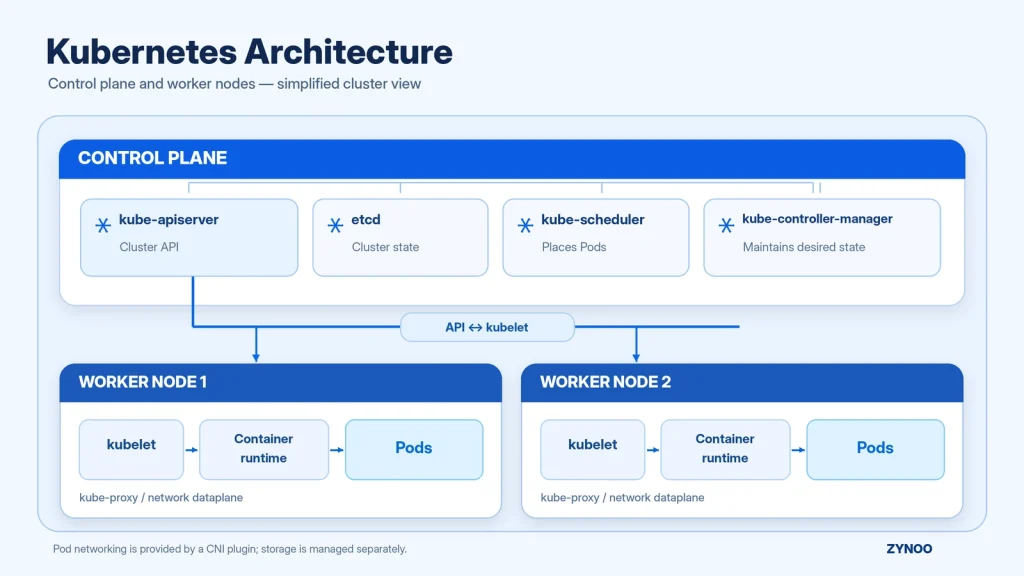
This simplified diagram illustrates the relationship between the control plane and worker nodes. Actual deployments can distribute components across multiple machines for availability.
1. Kubernetes Control Plane Components
The control plane manages the overall state of the Kubernetes cluster.
It includes several essential components.
kube-apiserver
The API server is the main communication point for Kubernetes. It processes requests from users, applications, and other cluster components.
Tools such as kubectl communicate with the cluster through the API server.
etcd
etcd is a distributed key-value store that maintains Kubernetes cluster data, including configurations and desired resource states.
It is essential for cluster operation and should be backed up appropriately.
kube-scheduler
The scheduler determines which worker node should run a newly created Pod.
It considers available CPU, memory, scheduling constraints, and workload requirements before selecting a node.
kube-controller-manager
The controller manager runs controllers that continuously monitor the cluster and work to maintain its desired state.
For example, if a Deployment requires three Pod replicas but only two are available, the relevant controller works to create a replacement.
Some cloud-based clusters also use a cloud-controller-manager to integrate with infrastructure services.
2. Kubernetes Worker Node Components
Worker nodes are physical or virtual servers that run application workloads.
Each node contains the components required to execute and manage Pods.
kubelet
The kubelet is an agent running on every worker node. It monitors assigned Pods and works with the container runtime to ensure their containers are running as specified.
Container Runtime
The container runtime manages container execution.
Kubernetes supports compatible runtimes such as containerd and CRI-O.
kube-proxy
kube-proxy implements network rules that help Kubernetes Services route traffic to application Pods.
Some networking solutions replace kube-proxy with their own implementation.
Pods
Pods are the smallest deployable units in Kubernetes.
A Pod usually contains one application container, although multiple closely related containers can share the same Pod.
For a general introduction to the platform, read our beginner’s Kubernetes guide.
3. How Kubernetes Components Work Together
Consider deploying an application that requires three replicas.
Here’s how the Kubernetes architecture handles the request:
- Deployment: You submit a Deployment configuration requesting three replicas.
- API server: Kubernetes validates the request and records the desired state.
- Controllers: The Deployment and ReplicaSet controllers work to create the required Pods.
- Scheduler: The scheduler selects suitable worker nodes for the Pods.
- Kubelet: Each assigned node’s kubelet instructs its container runtime to start the containers.
- Monitoring: Kubernetes controllers continue checking whether the actual state matches the desired state.
If a Pod fails, Kubernetes can replace it when suitable cluster resources are available.
This process enables automated workload management without manually starting containers on individual servers.
4. Kubernetes Networking and Storage Architecture
Kubernetes also relies on networking and storage components to support applications.
Networking: A Container Network Interface (CNI) plugin provides Pod networking. Kubernetes Services offer stable access to application Pods, even when individual Pods are replaced.
Storage: PersistentVolumes and PersistentVolumeClaims allow applications to use storage independently of individual Pod lifecycles. Dynamic provisioning commonly relies on Container Storage Interface (CSI) drivers.
Service discovery: Cluster DNS allows applications to locate Services using consistent names.
These components are particularly important for applications that communicate across multiple nodes or require persistent data.
5. Kubernetes Architecture vs Docker
Docker and Kubernetes serve different purposes.
Docker helps developers build and run containers, while Kubernetes coordinates containerized workloads across a cluster.
For a detailed explanation, read our Docker and Kubernetes comparison.
Can Kubernetes Run on a VPS?
Yes. Kubernetes can run on virtual private servers with sufficient CPU, RAM, storage, and compatible networking.
For learning and testing, you can start with a single-node Kubernetes environment. Production workloads requiring high availability generally need multiple nodes and a resilient control plane.
Our K3s installation tutorial explains how to deploy a lightweight Kubernetes environment on Ubuntu.
If you need server infrastructure for a self-managed environment, explore ZYNOO VPS hosting for available configurations.
Final Thoughts
Understanding the Kubernetes architecture Diagram starts with recognizing how the control plane and worker nodes interact.
The API server, etcd, scheduler, controllers, kubelet, and container runtime each perform different tasks to keep applications running.
Once you understand these components and their relationships, Kubernetes becomes easier to configure, troubleshoot, and scale.