DNS (Domain Name System) is the system that connects domain names, such as example.com, to the IP addresses computers use to find websites and other internet services. Instead of remembering a numerical address, you simply enter a website’s name into your browser.
But DNS does more than help websites load. It also directs email, supports domain verification, and helps internet services locate the correct servers.
Here’s how DNS works and what you should know when managing a website.
How Does DNS Work?
Think of DNS as the internet’s address book.
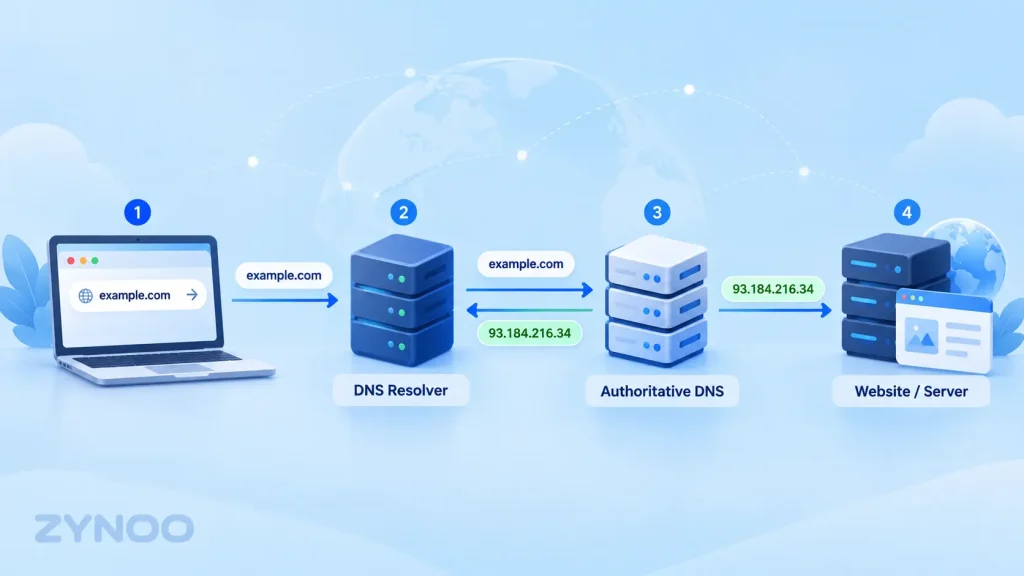
When you enter example.com into your browser, your device needs to find the server associated with that domain. DNS provides the information required to locate it.
The process is called DNS resolution.
Here’s what typically happens:
- You enter a domain name. Your browser needs the IP address associated with the website.
- A DNS resolver checks its cache. If it already has a valid answer, it can return it immediately.
- The resolver looks up the domain. If necessary, it queries DNS infrastructure, including root, top-level domain (TLD), and authoritative nameservers.
- The IP address is returned. The authoritative DNS information tells the resolver where the requested hostname points.
- Your browser connects to the website. It uses the returned address to establish a connection and request the webpage.
This process usually happens automatically, without you noticing it.
DNS doesn’t store your website’s pages or images. It helps your browser locate the infrastructure serving them.
What Are DNS Servers?
Several types of DNS servers work together to resolve domain names.
Recursive DNS Resolver
A recursive resolver receives DNS requests from your device and looks for the answers.
Your internet provider may supply a resolver, although public services such as Cloudflare DNS and Google Public DNS are also available.
Root Nameserver
Root nameservers help direct queries toward the nameservers responsible for top-level domains such as .com, .net, and .org.
TLD Nameserver
A top-level domain nameserver identifies where to find the authoritative DNS servers for a particular registered domain.
Authoritative Nameserver
An authoritative nameserver holds the DNS records for a domain and provides the definitive information used to resolve its hostnames.
When managing a website, these authoritative DNS records are especially important.
Common DNS Record Types Explained
DNS records control how different services associated with your domain are located and configured.
Here are the records website owners encounter most often.
| Record | Purpose | Example |
|---|---|---|
| A | Points a hostname to an IPv4 address | 192.0.2.10 |
| AAAA | Points a hostname to an IPv6 address | 2001:db8::10 |
| CNAME | Makes one hostname an alias of another | www → example.com |
| MX | Identifies email servers for a domain | mail.example.com |
| TXT | Stores text used for verification and email security | SPF or domain verification |
| NS | Identifies authoritative nameservers | ns1.example.net |
The IP addresses above are documentation examples, not real hosting addresses.
Why Do DNS Records Matter?
Imagine you’ve purchased a domain and a web hosting plan.
Your website files are stored on the hosting server, but visitors still need a way to find that server.
An A record can point your domain to the hosting server’s IPv4 address. Meanwhile, MX records direct incoming email to the appropriate mail servers.
Incorrect records can cause a website to become inaccessible or email delivery to fail, even when the hosting server is operating normally.
DNS vs. Domain Name vs. Web Hosting
These three terms are related but mean different things.
Domain name: The human-readable address people enter to find your website, such as example.com.
DNS: The system that provides the information needed to locate services associated with that domain.
Web hosting: The infrastructure that stores and delivers your website’s files and applications.
You don’t necessarily need to purchase all three from the same provider.
For example, your domain could be registered with one company, its DNS managed by another, and its website hosted on a ZYNOO server.
What matters is that the DNS configuration points visitors to the correct destination.
What Are Nameservers?
Nameservers are DNS servers responsible for answering queries about domains.
When setting up hosting, your provider may ask you to change your domain’s nameservers.
This tells the DNS system which authoritative service is responsible for your domain’s records.
For example, if your hosting provider supplies DNS management, you may be instructed to use its nameservers.
Alternatively, you can keep your existing DNS provider and update the required A, AAAA, CNAME, or other records.
Important: Changing nameservers can affect your website and email. Before switching, make sure the new DNS provider contains all necessary records.
What Is DNS Propagation?
DNS propagation describes the period during which DNS changes become visible to different resolvers and users across the internet.
When you update a DNS record, some resolvers may continue using their previously cached answer until it expires.
This is influenced by a setting called TTL (Time to Live), which tells DNS caches how long a record may be retained.
For example, a TTL of 3,600 seconds corresponds to one hour.
However, DNS changes don’t always become visible everywhere at exactly the same time. Resolver behavior, existing cached records, and changes to nameserver delegation can affect the process.
If you’ve recently changed your DNS settings, allow time for caches to update before assuming something is broken.
How to Check Your DNS Records
You can inspect DNS information using built-in command-line tools.
On Windows, macOS, or Linux systems with nslookup available, open a terminal and run:
nslookup example.comTo check MX records:
nslookup -type=MX example.comTo check nameservers:
nslookup -type=NS example.comReplace example.com with your domain.
These commands help you see what DNS information your configured resolver returns.
If you’re using cPanel, you can also manage supported DNS records through its Zone Editor, provided your DNS zone is hosted there.
ZYNOO’s knowledge base guide to adding an A record in cPanel explains the basic procedure.
What Happens When DNS Isn’t Working?
A DNS problem can prevent users from reaching your website even when the web server is running correctly.
Common causes include:
- Incorrect or missing DNS records.
- Nameservers pointing to the wrong provider.
- Expired or suspended domain registration.
- Cached DNS information that hasn’t expired.
- Temporary resolver or authoritative DNS server problems.
For example, the browser error DNS_PROBE_FINISHED_NXDOMAIN can appear when DNS reports that the requested hostname doesn’t exist.
Before changing hosting configurations, verify the domain registration, nameserver delegation, and relevant DNS records.
Frequently Asked Questions
No. DNS is a naming system, while an IP address identifies a network destination. DNS commonly resolves domain names into IP addresses.
DNS resolution is normally included with internet connectivity. Many domain registrars and hosting providers also include DNS management, although some advanced DNS services have paid plans.
Not necessarily. A faster resolver can reduce lookup time, but overall website speed also depends on server performance, caching, network conditions, and page optimization.
Yes. You can register and manage a domain without hosting a website. If you want the domain to display a website, you’ll need appropriate hosting or another service.
Conclusion
DNS is one of the fundamental systems that makes the internet easy to use. It connects familiar domain names with the servers and services behind them.
Understanding DNS records, nameservers, and caching can help you configure hosting, manage email, and troubleshoot domain-related problems.
You don’t need to master every technical detail, but knowing how DNS works makes managing a website considerably easier.