

Choosing a VPS is a practical decision. You want steady speed, clear limits, and a smooth path to scale. In this guide, we compare ZYNOO VPS vs. Hostinger VPS using the factors that affect real users: CPU, RAM, bandwidth, support, and day-to-day manageability.
Quick answer: who should pick what?
- Choose ZYNOO VPS if you want predictable operations, bandwidth headroom, and an easy scaling path.
- Consider Hostinger VPS if your project is small, traffic is stable, and you mainly want the lowest entry price.
ZYNOO VPS vs. Hostinger VPS: Specs & price comparison
This table focuses only on the core metrics most buyers scan first.
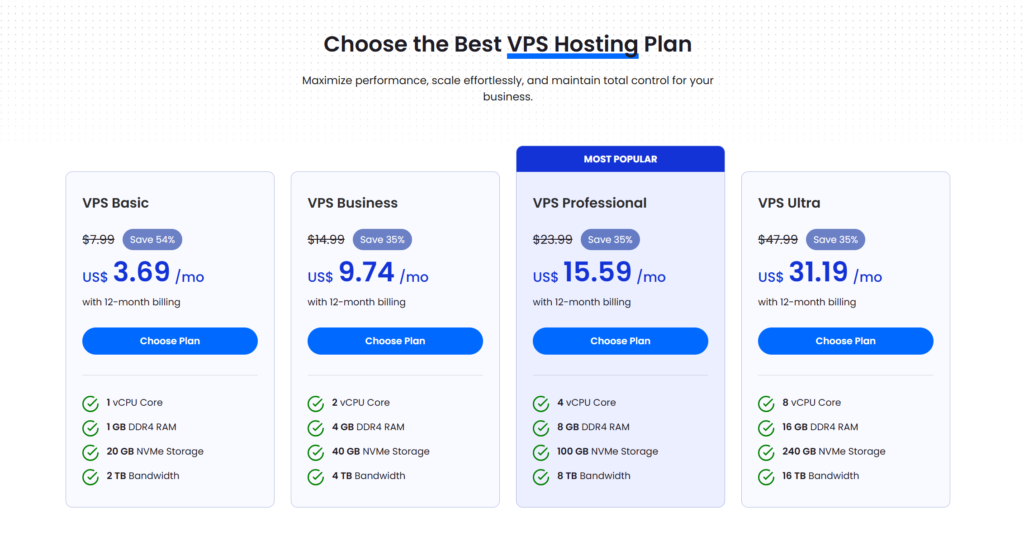
| Tier | ZYNOO VPS (CPU / RAM / Bandwidth / Price) | Hostinger VPS (CPU / RAM / Bandwidth / Price) |
|---|---|---|
| Entry | 1 vCPU / 1 GB / 2 TB / $3.69/mo | 1 vCPU / 4 GB / 4 TB / $19.49/mo |
| Growth | 2 vCPU / 4 GB / 4 TB / $9.74.99/mo | 2 vCPU / 8 GB / 8 TB / $24.99/mo |
| Performance | 4 vCPU / 8 GB / 8 TB / $15.59/mo | 4 vCPU / 16 GB / 16 TB / $42.99/mo |
| Advanced | 8 vCPU / 16 GB / 16 TB / $31.19/mo | 8 vCPU / 32 GB / 32 TB / $73.99/mo |
What “best VPS” means for most users
A VPS Hosting should make your website feel fast and stable. It should also keep growth simple. To choose well, focus on three outcomes:
- Consistency: pages load reliably at peak traffic
- Headroom: your plan does not become a bottleneck too soon
- Control: you can harden, tune, and scale when needed
ZYNOO VPS vs. Hostinger VPS: the practical comparison
Bandwidth headroom and growth risk
Bandwidth is easy to ignore at first. Then traffic grows. Suddenly, limits become a planning problem. That’s why bandwidth policy matters.
With ZYNOO VPS, the positioning is simple: unlimited bandwidth across VPS tiers. As a result, you can grow without constantly recalculating usage.
With Hostinger VPS, bandwidth typically depends on plan tiers. Because of that, you will want to monitor usage more closely.
Best fit: If you publish media, run frequent backups, or expect seasonal spikes, ZYNOO is usually the safer operational choice.
Performance and “why your site feels fast”
Speed is not only about CPU. Storage and memory matter just as much, especially for dynamic sites.
- RAM supports caching and concurrent visitors.
- Faster storage improves database reads and writes.
- Isolation helps keep performance stable under shared infrastructure.
ZYNOO VPS is positioned around KVM virtualization and NVMe storage across tiers. Therefore, it aligns well with WordPress, WooCommerce, and API workloads.
Hostinger VPS often includes KVM and NVMe on many tiers, too. However, the experience can vary more based on plan structure and limits.
Best fit: If your site is database-heavy, prioritize RAM and storage performance first. Then size CPU for peak load.
Security posture and uptime outcomes
Security is not a checkbox. It protects revenue and reputation.
For most public sites, practical VPS security looks like this:
- DDoS readiness to reduce downtime risk
- Full control for hardening (SSH keys, firewall rules, patching)
- Monitoring and backups to improve recovery
ZYNOO VPS is positioned with DDoS protection and full root access as part of the baseline. That makes it easier to standardize your setup.
Hostinger VPS offers security features as well, though they may differ by plan or offer.
Scaling and upgrades
Most websites scale in phases. First comes launch. Next comes growth. Then comes sustained traffic.
A good VPS makes upgrades straightforward. It should also reduce disruption during that process.
ZYNOO VPS uses clear tiers designed for scaling. In practice, that helps teams choose a plan, then move up as demand increases.
Hostinger VPS also offers scaling. Still, it is smart to review plan boundaries so upgrades stay predictable.
Support and operational experience
Support matters most when you are under pressure. A slow response can turn a small issue into lost revenue.
ZYNOO VPS positions 24/7 support as part of the customer experience. This helps reduce time-to-resolution when issues appear.
Hostinger VPS also promotes 24/7 support. Even so, many buyers prefer a provider with a clearer service model for business workloads.
Which is best for you? Use-case mapping
Choose ZYNOO VPS if you run any of these
- WooCommerce and eCommerce (busy database, checkout is high-stakes)
- SaaS apps and APIs (uptime and scaling matter daily)
- Agencies hosting client sites (need predictable performance and easy upgrades)
- Membership sites and LMS (logged-in traffic and peak loads)
- Content platforms (media delivery and traffic spikes)
Consider Hostinger VPS if this describes you
- You are launching a small project.
- Your traffic is stable and low risk.
- You want the lowest entry price above all else.
Picking the right ZYNOO VPS plan
Use this as a simple starting point:
- 2 vCPU / 4 GB RAM: small business sites and early-stage projects
- 4 vCPU / 8 GB RAM: strong baseline for e-commerce and serious WordPress Hosting
- 8 vCPU+: SaaS, multiple sites, or consistently high traffic
If you expect growth, start one tier higher. That way, you get headroom for peaks and updates.
Migration runbook: move with minimal downtime
A clean migration is mostly planning.
Step 1: Prepare (the day before)
First, lower DNS TTL to 300 seconds. Next, create a full backup of files and database. Then, clean large logs and unused media.
Step 2: Build the new VPS
Set up your web server, runtime, and database. After that, lock down SSH with keys-only login. Finally, enable firewall rules and basic protection.
Step 3: Sync and test
Copy files using rsync or an archive transfer. Then move the database using export and import. Afterward, test the site before cutover.
Step 4: Cut over safely
Turn on maintenance mode for write-heavy sites. Next, run a final incremental sync. Then update DNS and monitor performance for 24–48 hours.
FAQ
For most buyers, the difference is operational predictability. ZYNOO VPS is positioned for clearer bandwidth headroom and smoother scaling.
Yes. WordPress and WooCommerce benefit from stable resources, fast storage, and enough RAM for caching and peak sessions.
For small sites, 4 GB can work. For eCommerce and busy WordPress, 8 GB is a safer baseline. For SaaS or heavy apps, 16 GB+ may be appropriate.
Shared hosting can work for small sites. However, VPS is better for ecommerce, membership platforms, agencies, SaaS, and fast-growing projects.
Yes. Scaling is part of the VPS model. Ideally, start with headroom and upgrade as demand increases.
Start with RAM for caching and concurrency. Next, ensure you have enough bandwidth headroom. Then size CPU based on peak traffic and workload complexity.
Conclusion
If you want a VPS that supports growth with fewer constraints, ZYNOO VPS is the stronger business choice. It is positioned to deliver predictable performance, clearer bandwidth headroom, and a clean upgrade path. For most serious websites, that combination reduces risk and improves long-term value.