
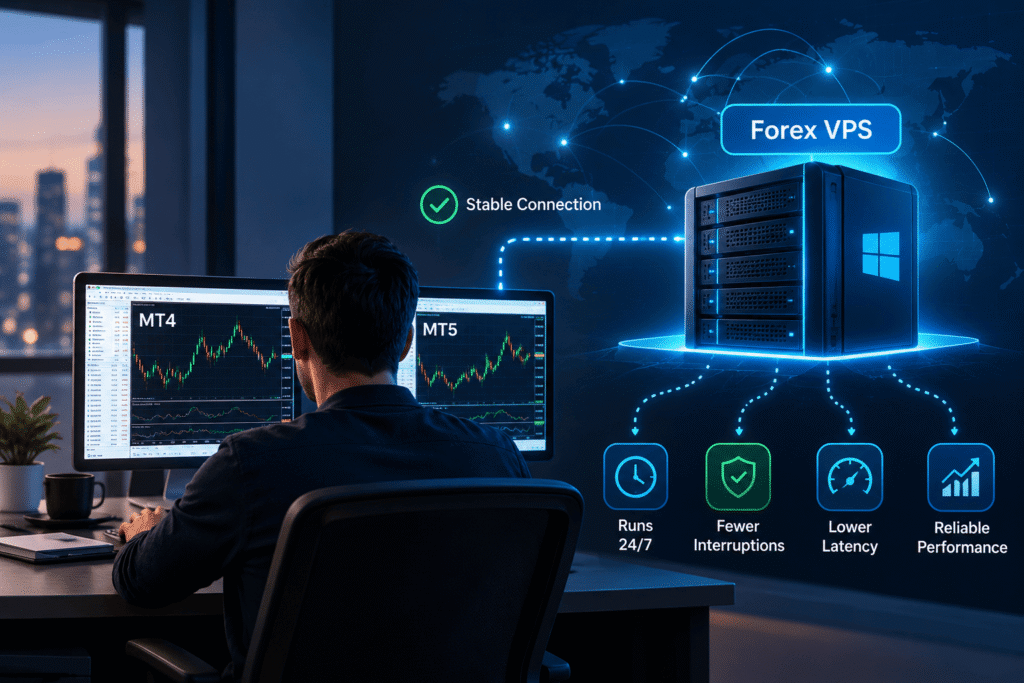
What is a Forex VPS? A Forex VPS (Virtual Private Server) is a remote server that keeps trading platforms such as MetaTrader 4 (MT4) and MetaTrader 5 (MT5) running independently of your personal computer. It allows Expert Advisors (EAs), trading bots, and other automated tools to operate continuously, even when your computer is switched off.
For traders who depend on automation, a Forex VPS can reduce local connectivity problems and provide a more consistent operating environment.
This guide explains how Forex VPS hosting works, its benefits, and what to consider when choosing a server for your trading setup.
What Is a Forex VPS?
A Forex VPS is a virtual server hosted in a data center and configured to run trading software remotely.
Instead of keeping MT4 or MT5 running on your home computer, you install the platform on a VPS with its own operating system, computing resources, and internet connection.
Your trading applications can continue operating when:
- Your home internet connection fails.
- Your laptop or desktop is switched off.
- You travel or work from another location.
- Your local electricity supply is interrupted.
A VPS doesn’t eliminate every possibility of downtime. Server maintenance, operating system restarts, and connectivity issues can still affect trading applications.
If you’re unfamiliar with virtual servers, our What Is VPS Hosting? guide explains the underlying technology.
Why Do Traders Use a Forex VPS?
1. Continuous Operation for Trading Bots
Automated trading strategies often depend on software running throughout the trading session.
A Forex VPS provides an environment for running Expert Advisors, trade copiers, signal-based automation, and monitoring tools without relying on your personal computer.
This is particularly useful for strategies that need to monitor prices or manage positions while you’re away.
2. Fewer Local Interruptions
A home computer can lose connectivity, restart unexpectedly, or shut down during a power outage.
Hosting your trading platform in a data center reduces dependence on those local conditions. However, the VPS still needs proper maintenance, monitoring, and reliable infrastructure.
3. More Consistent Network Connectivity
A well-connected VPS can provide a stable network path to your broker’s trading server.
This matters for time-sensitive strategies such as scalping or automated order management, where network delays can affect when trading instructions reach the broker.
However, lower latency doesn’t guarantee better execution prices or eliminate slippage. Broker processing, liquidity, and market conditions still influence trade execution.
How Does a Forex VPS Work?
A Forex VPS works much like a remote computer.
With a Windows VPS, you connect through Remote Desktop Protocol (RDP), install your trading platform, and configure your accounts and automation tools.
The basic process is straightforward:
- Choose a suitable Windows VPS plan.
- Connect using Remote Desktop.
- Install MetaTrader 4, MetaTrader 5, or another compatible trading platform.
- Configure your trading account, EAs, and indicators.
- Leave the trading platform running and disconnect from RDP.
Your trading software can continue running after you disconnect from the remote desktop session. Avoid signing out of Windows if doing so would close your trading applications.
You can reconnect later to monitor positions, review logs, or update settings.
Forex VPS vs Home PC: What’s the Difference?
| Feature | Home Computer | Forex VPS |
|---|---|---|
| Runs when your PC is off | No | Yes |
| Depends on home internet | Yes | No |
| Affected by home power outages | Yes | Generally no |
| Continuous EA operation | Requires PC to stay on | Designed for remote operation |
| Remote management | Requires additional setup | RDP access on Windows |
| Maintenance | User manages local PC | VPS and applications still require maintenance |
For occasional manual trading, a personal computer may be sufficient.
For traders running automated strategies or multiple trading accounts, a VPS is often a more practical solution.
Why Choose a Windows VPS for Forex Trading?
Most traders using MT4 and MT5 choose Windows VPS hosting because MetaTrader is designed to work natively in Windows environments.
Windows also provides a familiar desktop interface and straightforward remote management.
Its main advantages include:
- Native support for MT4 and MT5.
- Compatibility with many Expert Advisors and DLL-dependent tools.
- Easy remote access using RDP.
- Familiar installation and software management.
Linux VPS hosting is possible for certain trading applications, but it may require compatibility tools or additional configuration.
Our Linux vs Windows hosting comparison explains the broader differences between these operating systems.
Who Needs a Forex VPS?
A Forex VPS is worth considering if you:
- Run automated trading strategies or Expert Advisors.
- Use trade copiers across multiple accounts.
- Need trading software available while traveling.
- Manage several MT4 or MT5 terminals.
- Want to separate your trading environment from your personal computer.
If you trade manually and only open your platform occasionally, a VPS may not be necessary.
How to Choose the Right Forex VPS
Not every VPS plan is equally suitable for trading. Focus on these requirements before making a decision.
1. Server Location and Broker Latency
The most important network distance is between your VPS and your broker’s trading server, not between the VPS and your home.
Latency measures how long data takes to travel across a network, typically expressed in milliseconds (ms).
A lower ping can reduce communication delays between your trading platform and broker.
For example, ZYNOO’s Forex VPS servers are located in Sofia, Bulgaria. This may be convenient for brokers with well-connected European infrastructure, but actual latency depends on your broker’s server location and network routing.
Before ordering, check your broker’s trading server location and request a latency test when possible.
2. CPU and RAM Requirements
Resource requirements depend on the number of terminals, active charts, indicators, and EAs you’re running.
As general planning guidance:
- 4 GB RAM: A starting point for one or two lightweight terminals.
- 8 GB RAM: More room for multiple terminals and moderate automation.
- 12–16 GB RAM: Worth considering for heavier multi-account setups.
These aren’t fixed requirements. Complex EAs and additional applications may need more resources.
Monitor actual CPU and memory usage and upgrade when necessary.
3. Reliable Infrastructure and Storage
Choose a provider with dependable infrastructure, fast storage, and responsive support.
NVMe SSD storage can improve application loading and general server responsiveness, although network latency is usually more important than storage speed for transmitting trade requests.
Also consider DDoS protection, remote access, and available server resources.
4. Security and Maintenance
A Forex VPS should be maintained like any other internet-connected server.
Use strong passwords, restrict RDP access where possible, apply security updates, and keep backups of your EAs and terminal configurations.
Schedule operating system restarts carefully and verify that your trading applications resume correctly afterward.
Keep Your Trading Bots Running 24/7
Reliable Windows VPS hosting for MT4, MT5, and automated trading with fast NVMe storage.
Common Forex VPS Mistakes to Avoid
Even a well-configured server requires attention.
Choosing solely by price: An inexpensive VPS isn’t useful if it lacks the resources or connectivity your applications need.
Ignoring broker latency: A powerful server with poor network routing may perform worse than a modest VPS closer to the broker.
Running too many terminals: Excessive CPU or memory usage can cause platform slowdowns.
Forgetting maintenance: Check trading connections, EA logs, updates, and restart behavior regularly.
A VPS improves the hosting environment, but it doesn’t replace good operational practices or sound risk management.
Run Your Trading Platform with ZYNOO
ZYNOO’s Forex VPS hosting provides Windows-based virtual servers designed for MT4, MT5, Expert Advisors, and automated trading.
Available features include NVMe SSD storage, KVM virtualization, full administrative access, DDoS protection, and 24/7 technical support.
Choose a plan based on your terminal count, processing requirements, and broker connectivity rather than paying for resources you don’t need.
Frequently Asked Questions
Yes. You can run multiple compatible trading terminals on one VPS, provided it has enough CPU, RAM, and storage for your setup.
Yes, if your trading platform and automation are running correctly on the VPS. You don’t need to keep your personal computer connected.
No. A VPS can improve operational reliability and reduce certain network delays, but it cannot guarantee profits, prevent losses, or eliminate market risk.
The underlying virtualization technology is similar. A Forex VPS is selected and configured specifically for trading applications, with priorities such as Windows compatibility, continuous operation, and connectivity to brokers.
Conclusion
A Forex VPS offers a practical way to keep MT4, MT5, and automated trading software running without depending on your home computer.
Its main advantages are continuous remote operation, fewer local interruptions, and the potential for lower network latency to your broker.
For automated traders, choosing a Windows VPS with sufficient resources and suitable broker connectivity can make everyday trading operations easier to manage.
The best Forex VPS is the one that meets your trading software’s requirements and maintains a reliable connection to your broker.