DDoS protection helps keep websites, applications, VPS hosting, and dedicated servers available by detecting and filtering malicious traffic designed to overwhelm them.
A distributed denial-of-service (DDoS) attack can disrupt services even when the underlying server is functioning correctly. Effective protection reduces the risk of downtime, performance problems, and lost business, although no solution can guarantee complete immunity.
Understanding how DDoS protection works—and the differences between network-level and application-level attacks—can help you choose the right defenses for your infrastructure.
What Is DDoS Protection?
DDoS protection refers to the technologies and processes used to identify, absorb, and mitigate distributed denial-of-service attacks.
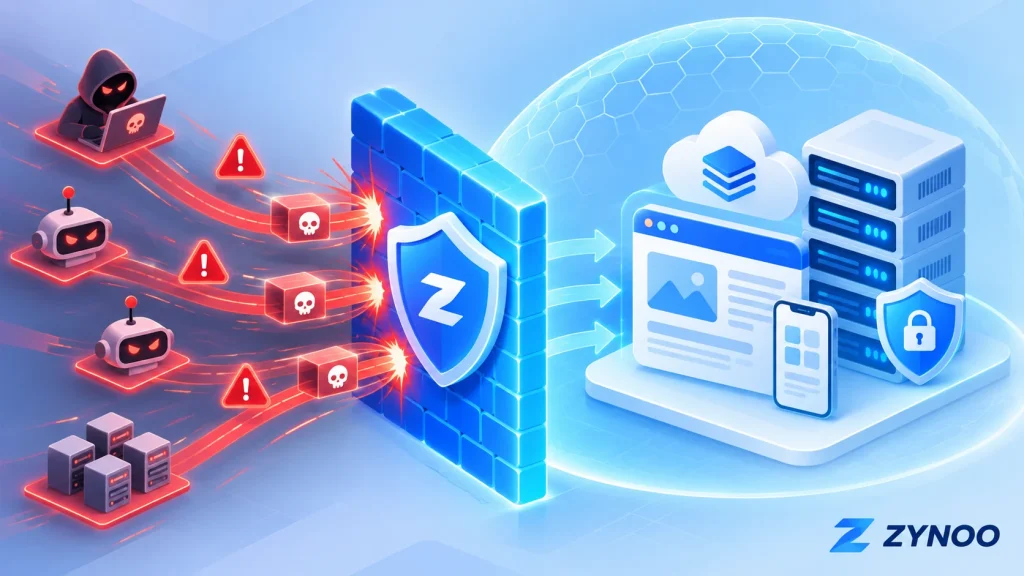
A DDoS attack typically involves numerous devices sending excessive traffic or requests toward a target. These devices may belong to a botnet, a network of compromised systems controlled by an attacker.
The objective is usually to exhaust bandwidth, connections, or computing resources so legitimate users cannot access the service.
Potential targets include websites, APIs, databases exposed through public services, game servers, and other internet-facing applications.
How Does DDoS Protection Work?
DDoS mitigation systems analyze incoming traffic to distinguish suspicious activity from legitimate requests.
A typical protection system uses several techniques:
- Traffic monitoring: Tracks bandwidth usage, packet rates, connections, and request patterns.
- Attack detection: Identifies unusual traffic volumes or behavior associated with known attack methods.
- Traffic filtering: Blocks, challenges, or limits suspicious requests.
- Traffic scrubbing: Separates malicious traffic from legitimate traffic, often using upstream infrastructure.
- Continuous mitigation: Adjusts protection as the attack changes.
For large attacks, filtering traffic before it reaches the hosting server is especially important. A local firewall cannot restore connectivity once the server’s incoming network connection has been saturated.
Layer 3/4 vs. Layer 7 DDoS Attacks
DDoS attacks can target different layers of network communication. Understanding these differences is essential because each type requires appropriate protection.
| Layer | Attack examples | Main target |
|---|---|---|
| Layer 3 — Network | ICMP floods | Network bandwidth and packet processing |
| Layer 4 — Transport | TCP SYN floods, UDP floods | Connections, transport services, and network capacity |
| Layer 7 — Application | HTTP floods, repeated API requests | Web servers, applications, and databases |
Layer 3 and Layer 4 Protection
Layer 3/4 attacks commonly target network capacity or connection-handling resources.
For example, a large UDP flood can overwhelm a network connection, while a TCP SYN flood can exhaust connection-related resources.
Network-level DDoS protection helps detect and filter these attacks before they disrupt hosted services.
Layer 7 Protection
Layer 7 attacks target applications rather than simply overwhelming network bandwidth.
An attacker might repeatedly request a resource-intensive webpage, search endpoint, or API operation.
These requests can resemble legitimate traffic, making application-level attacks harder to distinguish from normal activity.
Protection may involve HTTP traffic analysis, application-aware rate limiting, bot detection, and web application firewall rules.
The key difference: Layer 3/4 protection focuses on network and transport traffic, while Layer 7 protection examines application behavior. Websites may need both.
Why DDoS Protection Matters for VPS and Dedicated Servers
Both VPS and dedicated servers can experience DDoS attacks, although their resource configurations differ.
A VPS has allocated virtual resources, including CPU, RAM, and network capacity. Excessive malicious traffic can exhaust these resources or disrupt the surrounding network.
A dedicated server provides exclusive physical hardware, but that doesn’t make it immune to network saturation or application overload.
Even powerful servers can become inaccessible when upstream connectivity is overwhelmed.
For businesses, the consequences may include failed transactions, interrupted services, customer frustration, and lost revenue.
This makes DDoS mitigation relevant to e-commerce platforms, SaaS applications, game servers, APIs, and other publicly accessible services.
DDoS Protection vs. Firewall vs. WAF
These technologies complement one another, but they serve different purposes.
DDoS mitigation: Detects and filters traffic floods, often using network infrastructure capable of handling large attack volumes.
Network firewall: Controls traffic according to IP addresses, ports, protocols, and other rules. It reduces unnecessary exposure but cannot independently handle every large-scale attack.
Web Application Firewall (WAF): Inspects HTTP/HTTPS requests and applies application-aware security rules. It can help mitigate malicious requests and certain Layer 7 DDoS attacks.
Does a CDN Help Against DDoS Attacks?
Yes, when the CDN includes appropriate security and DDoS mitigation features.
A CDN can distribute traffic across multiple locations, cache eligible content, and filter suspicious requests before they reach the origin server.
However, protection may be bypassed if attackers can connect directly to an exposed origin IP address.
Also, ordinary website CDN protection doesn’t automatically cover non-HTTP services such as game-server traffic.
The appropriate solution depends on the protocols and services you’re protecting.
What to Look for in DDoS-Protected Hosting
When comparing hosting providers, consider more than the advertised mitigation capacity.
Attack coverage: Check whether protection covers Layer 3/4 attacks, Layer 7 attacks, or both.
Automatic mitigation: Determine whether protection operates continuously or activates after an attack is detected.
Supported services: Confirm coverage for your websites, APIs, game servers, and other required protocols.
Monitoring and support: Look for traffic visibility, mitigation alerts, and a clear process for reporting attacks.
False-positive handling: Legitimate visitors shouldn’t be unnecessarily blocked by aggressive filtering.
A large mitigation-capacity figure is useful, but it doesn’t guarantee protection against every attack or represent bandwidth dedicated to an individual server.
How to Improve Your DDoS Resilience
Hosting-level protection should form part of a broader security strategy.
- Close unnecessary network ports and restrict administrative interfaces.
- Use a WAF and carefully configured rate limits for public web applications.
- Protect origin-server access when using a reverse-proxy CDN.
- Monitor traffic patterns, application response times, and resource usage.
- Keep applications optimized and maintain reliable recovery procedures.
If you suspect an active attack, review traffic and service metrics, contact your hosting provider, and determine which services are affected.
Avoid making untested firewall changes during an incident, as these may block legitimate customers or administrative access.
Server-Level DDoS Protection: iptables, LiteSpeed, and Imunify360
Yes. Several server-level security tools can help reduce the impact of certain DDoS attacks when configured correctly.
- iptables: Linux firewall rules can restrict unwanted connections, block suspicious traffic, and apply rate limits. However, they cannot stop large attacks that saturate your server’s network connection.
- LiteSpeed Web Server: Built-in per-client throttling can limit excessive requests, connections, and bandwidth usage. Some advanced anti-DDoS features require specific LiteSpeed licenses.
- Imunify360: Provides firewall protection, DoS detection, bot challenges, and HTTP request rate limiting to help mitigate abusive traffic.
These tools work best alongside hosting-level DDoS mitigation. Network-layer protection handles traffic floods before they reach your server, while local security tools help control abusive connections and application requests.
Always test security rules carefully to avoid blocking legitimate users.
DDoS Protection at ZYNOO
ZYNOO includes DDoS mitigation with its VPS hosting and Bulgaria dedicated-server infrastructure.
Our infrastructure offers up to 500 Gbps of DDoS mitigation capacity, helping filter malicious traffic and reduce service disruption.
Customers can choose virtual or dedicated physical resources depending on their application requirements.
Explore our VPS hosting plans or Bulgaria dedicated servers to compare available configurations.
Mitigation capacity doesn’t guarantee protection from every attack. Confirm the relevant protocol coverage and application-level requirements for your service.
Frequently Asked Questions
No. Effective mitigation significantly improves resilience, but results depend on attack characteristics, network capacity, application behavior, and the available protection technologies.
Yes. Dedicated hardware provides exclusive computing resources but doesn’t prevent attackers from overwhelming network connections or applications.
Usually not. Firewalls help control access, but large traffic floods often require upstream mitigation. Websites may also benefit from WAFs and application-level rate limiting.
Conclusion
DDoS protection plays an important role in keeping websites, APIs, VPS hosting, and dedicated servers accessible during malicious traffic attacks.
The most effective approach combines upstream mitigation for Layer 3/4 threats with appropriate Layer 7 application security, monitoring, and incident planning.
When evaluating hosting infrastructure, choose protection based on the services you run and the threats they face—not mitigation capacity alone.