Server virtualization is a technology that allows multiple virtual servers to run independently on a single physical machine. Each virtual server has its own operating system, applications, and allocated computing resources.
Instead of purchasing separate physical hardware for every workload, businesses and hosting providers use virtualization to run multiple isolated environments on the same server.
This technology is also the foundation of modern VPS hosting.
Key Takeaways
- Server virtualization divides physical hardware into multiple independent virtual machines.
- A hypervisor manages CPU, RAM, storage, and network resources across virtual servers.
- Common approaches include full virtualization, paravirtualization, and OS-level virtualization.
- Virtualization improves hardware utilization, flexibility, and workload isolation, but still requires proper resource management.
How Does Server Virtualization Work?
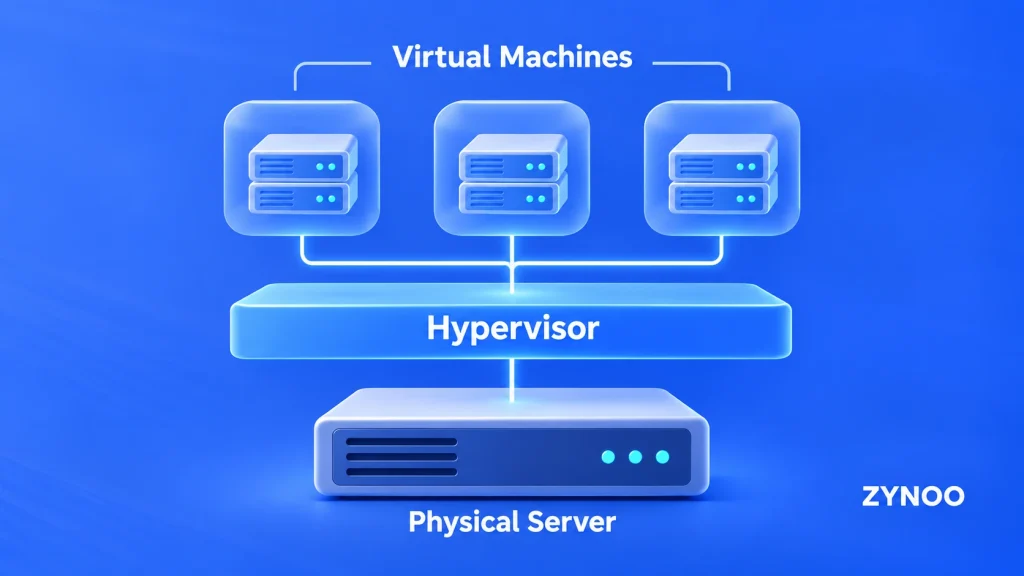
Server virtualization works by introducing a software layer called a hypervisor between physical hardware and virtual machines.
A typical setup includes three components:
- Physical server: The underlying machine containing processors, RAM, storage, and network interfaces.
- Hypervisor: Software that creates virtual machines and allocates hardware resources.
- Virtual machines (VMs): Independent environments running their own operating systems and applications.
For example, a physical server with 64 GB RAM can host several virtual machines, each assigned a portion of that memory.
Although these virtual machines share physical hardware, they operate as separate systems.
What Are the Types of Server Virtualization?
1. Full Virtualization
Full virtualization allows virtual machines to run their own operating systems without requiring modifications to those operating systems.
The hypervisor presents virtual hardware to each machine and manages its access to physical resources.
Modern platforms commonly use hardware-assisted virtualization to improve performance.
2. Paravirtualization
Paravirtualization allows a guest operating system or specialized drivers to communicate more efficiently with the hypervisor.
This can reduce overhead, particularly for storage and network operations.
Paravirtualized drivers are often used alongside modern full virtualization rather than as an entirely separate deployment method.
3. OS-Level Virtualization
OS-level virtualization creates isolated environments that share the host operating system’s kernel.
This approach is commonly associated with containers, including Docker and LXC.
Unlike traditional virtual machines, containers don’t require a separate operating system kernel for each instance.
This makes them lightweight, although they provide a different isolation model from hypervisor-based virtual machines.
What Is a Hypervisor?
A hypervisor is the software responsible for creating and managing virtual machines.
Hypervisors are generally divided into two categories:
- Type 1 (bare-metal): Runs directly on physical hardware or as part of a dedicated host virtualization platform. Commonly used in data centers and production environments.
- Type 2 (hosted): Runs as an application on an existing operating system, typically for development, testing, or desktop virtualization.
Popular virtualization technologies include KVM, VMware ESXi, Microsoft Hyper-V, and Xen.
Benefits of Server Virtualization
Virtualization offers several advantages for businesses and hosting providers.
- Better hardware utilization: Run multiple workloads on one physical server instead of leaving resources unused.
- Reduced infrastructure costs: Consolidating workloads can reduce hardware, power, and maintenance requirements.
- Flexible resource allocation: Adjust virtual CPU, RAM, and storage allocations as workloads change, subject to available capacity.
- Workload isolation: Keep applications in separate operating system environments.
- Simplified deployment: Create, clone, and manage virtual servers without installing new physical hardware.
Virtualization platforms can also support snapshots, backups, and virtual machine migration, making infrastructure management more flexible.
How Server Virtualization Powers VPS Hosting
A Virtual Private Server (VPS) is one of the most common applications of server virtualization.
Hosting providers use hypervisors to divide powerful physical servers into several isolated virtual environments.
Each VPS receives an allocation of CPU, RAM, storage, and networking resources, allowing customers to operate their own server environment without renting an entire physical machine.
For example, ZYNOO uses KVM virtualization for its VPS hosting platform, providing isolated virtual machines with NVMe storage and full root access.
If you’re unfamiliar with virtual hosting, our beginner’s guide to VPS hosting explains how these services work and when they’re useful.
Server Virtualization vs Dedicated Servers
The main difference is how physical hardware is allocated.
| Virtualized Server (VPS) | Dedicated Server |
|---|---|
| Shares physical hardware | Entire physical server allocated to one customer |
| Resources assigned through a hypervisor | Direct control over physical resources |
| Typically lower entry cost | Typically higher entry cost |
| Flexible virtual configurations | Greater hardware-level control |
A dedicated server can also host multiple virtual machines if its owner installs a virtualization platform.
For a closer look at physical hosting, read our guide to dedicated server hardware.
Are There Any Disadvantages?
Despite its benefits, server virtualization has limitations.
Running too many virtual machines on one host can create resource contention and affect application performance.
A physical server failure may also impact every virtual machine running on that host unless suitable redundancy and recovery systems are in place.
Additionally, virtualization introduces management overhead. Hypervisors, guest operating systems, and access controls must be maintained and secured.
When Is Server Virtualization Used?
Common use cases include website hosting, cloud infrastructure, software development, application testing, and enterprise IT systems.
Virtualization is especially useful when several applications need independent operating environments without requiring separate physical servers.
For businesses that need an isolated hosting environment with administrative control, ZYNOO KVM VPS hosting offers a practical way to use virtualization without managing the underlying physical hardware.
Final Thoughts
Server virtualization makes it possible to run multiple independent servers on one physical machine while improving resource utilization and deployment flexibility.
It’s a core technology behind VPS hosting, cloud computing, and modern IT infrastructure.
Understanding how hypervisors and virtual machines work helps you choose the right environment for your applications, whether that’s a VPS or dedicated physical hardware.